图书馆管理系统2
In our previous tutorial, we have explaind how to develop Hotel Reservation System with PHP and MySQL. In this tutorial , we will develop Library Management System with PHP and MySQL.
A Library Management System is a web based system used in library to manage items. It is used to store items details into database and track records of items such as users, books, number of issued books, retuned books, not returned books after due date and much more.
Here we will develop a live example of Library Management System and cover following.
The Administrator will do the following:
- Manage Category.
- Manage Author.
- Manage Publisher.
- Manage Rack
- Manage Books
- Mange Issue Books
- Manage Users
So let’s implement Library Management System. The file structure are:
- library-management-system
- config
- class
- User.php
- Author.php
- Books.php
- IssueBooks.php
- Category.php
- Publisher.php
- Rack.php
- js
- user.js
- author.js
- books.js
- category.js
- publisher.js
- rack.js
- index.php
- dashboard.php
- user.php
- category.php
- publisher.php
- author.php
- rack.php
- books.php
- issue_books.php
Step1: MySQL Database Tables
First we will create MySQL database tables to implement our library system. Below is tables schema to create tables. You can also get complete database tables with data in download project zip file.
We will create user table to store user login details.
CREATE TABLE `user` (
  `id` int(11) UNSIGNED NOT NULL,
  `first_name` varchar(255) DEFAULT NULL,
  `last_name` varchar(255) DEFAULT NULL,
  `email` varchar(255) DEFAULT NULL,
  `password` varchar(64) NOT NULL,
  `role` enum('admin','user') DEFAULT 'admin'
) ENGINE=InnoDB DEFAULT CHARSET=utf8;

ALTER TABLE `user`
  ADD PRIMARY KEY (`id`);

ALTER TABLE `user`
  MODIFY `id` int(11) UNSIGNED NOT NULL AUTO_INCREMEN;
We will create table author to store book author details.
CREATE TABLE `author` (
  `authorid` int(11) NOT NULL,
  `name` varchar(200) COLLATE utf8_unicode_ci NOT NULL,
  `status` enum('Enable','Disable') COLLATE utf8_unicode_ci NOT NULL
) ENGINE=InnoDB DEFAULT CHARSET=utf8 COLLATE=utf8_unicode_ci;

ALTER TABLE `author`
  ADD PRIMARY KEY (`authorid`);

ALTER TABLE `author`
  MODIFY `authorid` int(11) NOT NULL AUTO_INCREMENT, AUTO_INCREMENT=4;
We will create table publisher to store book publisher details.
CREATE TABLE `publisher` (
  `publisherid` int(11) NOT NULL,
  `name` varchar(255) NOT NULL,
  `status` enum('Enable','Disable') NOT NULL
) ENGINE=InnoDB DEFAULT CHARSET=utf8mb4;

ALTER TABLE `publisher`
  ADD PRIMARY KEY (`publisherid`);

ALTER TABLE `publisher`
  MODIFY `publisherid` int(11) NOT NULL AUTO_INCREMENT, AUTO_INCREMENT=10;
We will create table category to store book category details.
CREATE TABLE `category` (
  `categoryid` int(11) NOT NULL,
  `name` varchar(200) COLLATE utf8_unicode_ci NOT NULL,
  `status` enum('Enable','Disable') COLLATE utf8_unicode_ci NOT NULL
) ENGINE=InnoDB DEFAULT CHARSET=utf8 COLLATE=utf8_unicode_ci;

ALTER TABLE `category`
  ADD PRIMARY KEY (`categoryid`);

ALTER TABLE `category`
  MODIFY `categoryid` int(11) NOT NULL AUTO_INCREMENT, AUTO_INCREMENT=7;
We will create table rack to store book rack location details.
CREATE TABLE `rack` (
  `rackid` int(11) NOT NULL,
  `name` varchar(200) COLLATE utf8_unicode_ci NOT NULL,
  `status` enum('Enable','Disable') COLLATE utf8_unicode_ci NOT NULL DEFAULT 'Enable'
) ENGINE=InnoDB DEFAULT CHARSET=utf8 COLLATE=utf8_unicode_ci;

ALTER TABLE `rack`
  ADD PRIMARY KEY (`rackid`);

ALTER TABLE `rack`
  MODIFY `rackid` int(11) NOT NULL AUTO_INCREMENT, AUTO_INCREMENT=4;
We will create table book to store book details.
CREATE TABLE `book` (
  `bookid` int(11) NOT NULL,
  `categoryid` int(11) NOT NULL,
  `authorid` int(11) NOT NULL,
  `rackid` int(11) NOT NULL,
  `name` text COLLATE utf8_unicode_ci NOT NULL,
  `picture` varchar(250) COLLATE utf8_unicode_ci NOT NULL,
  `publisherid` int(11) NOT NULL,
  `isbn` varchar(30) COLLATE utf8_unicode_ci NOT NULL,
  `no_of_copy` int(5) NOT NULL,
  `status` enum('Enable','Disable') COLLATE utf8_unicode_ci NOT NULL,
  `added_on` datetime NOT NULL DEFAULT current_timestamp(),
  `updated_on` datetime NOT NULL DEFAULT current_timestamp()
) ENGINE=InnoDB DEFAULT CHARSET=utf8 COLLATE=utf8_unicode_ci;

ALTER TABLE `book`
  ADD PRIMARY KEY (`bookid`);

ALTER TABLE `book`
  MODIFY `bookid` int(11) NOT NULL AUTO_INCREMENT, AUTO_INCREMENT=5;
We will create table issued_book to store book issue details.
CREATE TABLE `issued_book` (
  `issuebookid` int(11) NOT NULL,
  `bookid` int(11) NOT NULL,
  `userid` int(11) NOT NULL,
  `issue_date_time` datetime NOT NULL DEFAULT current_timestamp(),
  `expected_return_date` datetime NOT NULL,
  `return_date_time` datetime NOT NULL,
  `status` enum('Issued','Returned','Not Return') COLLATE utf8_unicode_ci NOT NULL
) ENGINE=InnoDB DEFAULT CHARSET=utf8 COLLATE=utf8_unicode_ci;

ALTER TABLE `issued_book`
  ADD PRIMARY KEY (`issuebookid`);

ALTER TABLE `issued_book`
  MODIFY `issuebookid` int(11) NOT NULL AUTO_INCREMENT, AUTO_INCREMENT=4;
Step2: Manage User
Now we will implement user section. We will create user.php file and create HTML for adding new users.
<div id="userModal" class="modal fade">
		<div class="modal-dialog">
			<form method="post" id="userForm">
				<div class="modal-content">
					<div class="modal-header">
						<button type="button" class="close" data-dismiss="modal">×</button>
						<h4 class="modal-title"><i class="fa fa-plus"></i> Edit User</h4>
					</div>
					<div class="modal-body">

						<div class="form-group">
							<label for="country" class="control-label">Role</label>
							<select class="form-control" id="role" name="role"/>
								<option value="">Select Role</option>
								<option value="admin">Admin</option>
								<option value="user">User</option>
							</select>
						</div>

						<div class="form-group">
							<label for="Income" class="control-label">First Name</label>
							<input type="text" name="first_name" id="first_name" autocomplete="off" class="form-control" placeholder="first name"/>

						</div>

						<div class="form-group"
							<label for="project" class="control-label">Last Name</label>
							<input type="text" class="form-control" id="last_name" name="last_name" placeholder="Last name" >
						</div>

						<div class="form-group"
							<label for="project" class="control-label">Email</label>
							<input type="email" class="form-control" id="email" name="email" placeholder="Email" >
						</div>

						<div class="form-group"
							<label for="project" class="control-label">New Password</label>
							<input type="password" class="form-control" id="password" name="password" placeholder="password" >
						</div>

					</div>
					<div class="modal-footer">
						<input type="hidden" name="id" id="id" />
						<input type="hidden" name="action" id="action" value="" />
						<input type="submit" name="save" id="save" class="btn btn-info" value="Save" />
						<button type="button" class="btn btn-default" data-dismiss="modal">Close</button>
					</div>
				</div>
			</form>
		</div>
	</div>
</div>
We will handle form submit in user.js and send ajax request to user_action.php with action addUser to create new user.
$("#userModal").on('submit','#userForm', function(event){
	event.preventDefault();
	$('#save').attr('disabled','disabled');
	var formData = $(this).serialize();
	$.ajax({
		url:"user_action.php",
		method:"POST",
		data:formData,
		success:function(data){
			$('#userForm')[0].reset();
			$('#userModal').modal('hide');
			$('#save').attr('disabled', false);
			userRecords.ajax.reload();
		}
	})
});
We will check for add user action and call user method insert() to insert user record.
if(!empty($_POST['action']) && $_POST['action'] == 'addUser') {
	$user->role = $_POST["role"];
	$user->first_name = $_POST["first_name"];
	$user->last_name = $_POST["last_name"];
	$user->email = $_POST["email"];
	$user->password = $_POST["password"];
	$user->insert();
}
We will implement method insert() in User.php class to insert user record.
public function insert(){
	if($this->role && $this->email && $this->password && $_SESSION["userid"]) {
		$stmt = $this->conn->prepare("
			INSERT INTO ".$this->userTable."(`first_name`, `last_name`, `email`, `password`, `role`)
			VALUES(?, ?, ?, ?, ?)");
		$this->role = htmlspecialchars(strip_tags($this->role));
		$this->email = htmlspecialchars(strip_tags($this->email));
		$this->first_name = htmlspecialchars(strip_tags($this->first_name));
		$this->last_name = htmlspecialchars(strip_tags($this->last_name));
		$this->password = md5($this->password);
		$stmt->bind_param("sssss", $this->first_name, $this->last_name, $this->email, $this->password, $this->role);

		if($stmt->execute()){
			return true;
		}
	}
}
Step3: Manage Books
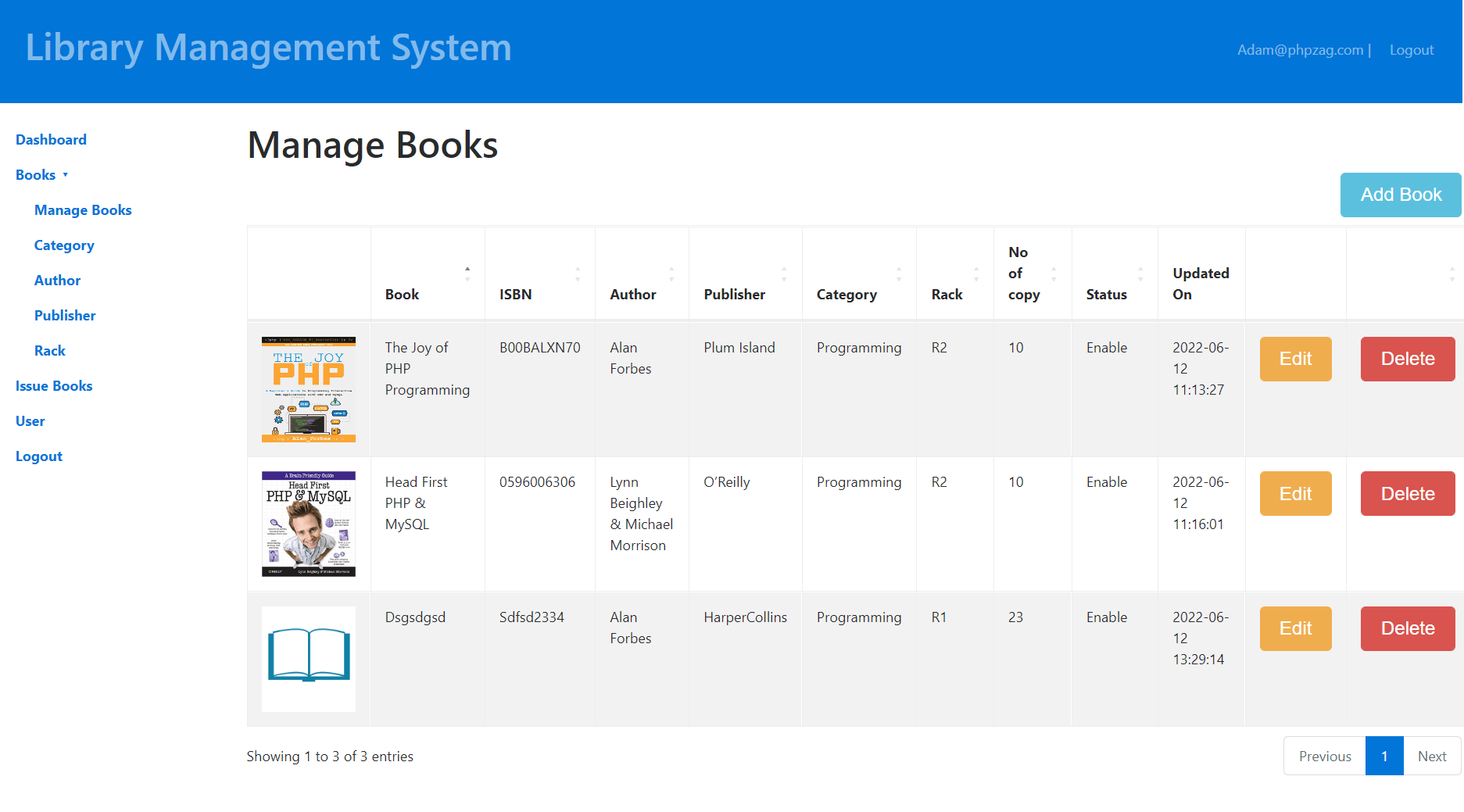
We will implement functionality to manage books to add, edit and delete books records. We will create HTML in books.php to implement functionality.
<div class="panel-heading">
	<div class="row">
		<div class="col-md-10">
			<h3 class="panel-title"></h3>
		</div>
		<div class="col-md-2" align="right">
			<button type="button" id="addBook" class="btn btn-info" title="Add book"><span class="glyphicon glyphicon-plus">Add Book</span></button>
		</div>
	</div>
</div>
<table id="bookListing" class="table table-striped table-bordered">
	<thead>
		<tr>
			<td></td>
			<th>Book</th>
			<th>ISBN</th>
			<th>Author</th>
			<th>Publisher</th>
			<th>Category</th>
			<th>Rack</th>
			<th>No of copy</th>
			<th>Status</th>
			<th>Updated On</th>
			<th></th>
			<th></th>
		</tr>
	</thead>
</table>
We will implement method insert() in Books.php class to insert records.
public function insert(){

	if($this->name && $_SESSION["userid"]) {

		$stmt = $this->conn->prepare("
			INSERT INTO ".$this->bookTable."(`name`, `status`, `isbn`, `no_of_copy`, `categoryid`, `authorid`, `rackid`, `publisherid`)
			VALUES(?, ?, ?, ?, ?, ?, ?, ?)");

		$this->name = htmlspecialchars(strip_tags($this->name));
		$this->isbn = htmlspecialchars(strip_tags($this->isbn));
		$this->no_of_copy = htmlspecialchars(strip_tags($this->no_of_copy));
		$this->author = htmlspecialchars(strip_tags($this->author));
		$this->publisher = htmlspecialchars(strip_tags($this->publisher));
		$this->category = htmlspecialchars(strip_tags($this->category));
		$this->rack = htmlspecialchars(strip_tags($this->rack));
		$this->status = htmlspecialchars(strip_tags($this->status));

		$stmt->bind_param("sssiiiii", $this->name, $this->status, $this->isbn, $this->no_of_copy, $this->category, $this->author, $this->rack, $this->publisher);

		if($stmt->execute()){
			return true;
		}
	}
}
We will implement update() method in Books.php class to update records.
public function update(){

	if($this->name && $_SESSION["userid"]) {

		$stmt = $this->conn->prepare("
			UPDATE ".$this->bookTable."
			SET name = ?, status = ?, isbn = ?, no_of_copy = ?, categoryid = ?, authorid = ?, rackid = ?, publisherid = ?
			WHERE bookid = ?");

		$this->name = htmlspecialchars(strip_tags($this->name));
		$this->isbn = htmlspecialchars(strip_tags($this->isbn));
		$this->no_of_copy = htmlspecialchars(strip_tags($this->no_of_copy));
		$this->author = htmlspecialchars(strip_tags($this->author));
		$this->publisher = htmlspecialchars(strip_tags($this->publisher));
		$this->category = htmlspecialchars(strip_tags($this->category));
		$this->rack = htmlspecialchars(strip_tags($this->rack));
		$this->status = htmlspecialchars(strip_tags($this->status));
		$this->bookid = htmlspecialchars(strip_tags($this->bookid));

		$stmt->bind_param("sssiiiiii", $this->name, $this->status, $this->isbn, $this->no_of_copy, $this->category, $this->author, $this->rack, $this->publisher, $this->bookid);

		if($stmt->execute()){
			return true;
		}
	}
}
Step4: Manage Issued Books
We will implement to manage issued books. We will created issue_books.php and created HTML to implement functionality.
<div class="panel-heading">
		<div class="row">
			<div class="col-md-10">
				<h3 class="panel-title"></h3>
			</div>
			<div class="col-md-2" align="right">
				<button type="button" id="issueBook" class="btn btn-info" title="issue book"><span class="glyphicon glyphicon-plus">Issue Book</span></button>
			</div>
		</div>
	</div>
	<table id="issuedBookListing" class="table table-striped table-bordered">
		<thead>
			<tr>
				<th>Id</th>
				<th>Book</th>
				<th>ISBN</th>
				<th>User</th>
				<th>Issue Date</th>
				<th>Expected Return</th>
				<th>Return Date</th>
				<th>Status</th>
				<th></th>
				<th></th>
			</tr>
		</thead>
	</table>
	</div>
</div>
we will implement method listIssuedBook() in IssueBooks.php class to list issued books.
public function listIssuedBook(){

	$sqlQuery = "SELECT issue_book.issuebookid, issue_book.issue_date_time, issue_book.expected_return_date, issue_book.return_date_time, issue_book.status, book.name As book_name, book.isbn, user.first_name, user.last_name
		FROM ".$this->issuedBookTable." issue_book
		LEFT JOIN ".$this->bookTable." book ON book.bookid = issue_book.bookid
		LEFT JOIN ".$this->userTable." user ON user.id = issue_book.userid ";

	if(!empty($_POST["search"]["value"])){
		$sqlQuery .= ' WHERE (issue_book.issuebookid LIKE "%'.$_POST["search"]["value"].'%" ';
		$sqlQuery .= ' OR issue_book.issue_date_time LIKE "%'.$_POST["search"]["value"].'%" ';
		$sqlQuery .= ' OR issue_book.status LIKE "%'.$_POST["search"]["value"].'%" ';
	}

	if(!empty($_POST["order"])){
		$sqlQuery .= 'ORDER BY '.$_POST['order']['0']['column'].' '.$_POST['order']['0']['dir'].' ';
	} else {
		$sqlQuery .= 'ORDER BY issue_book.issuebookid DESC ';
	}

	if($_POST["length"] != -1){
		$sqlQuery .= 'LIMIT ' . $_POST['start'] . ', ' . $_POST['length'];
	}

	$stmt = $this->conn->prepare($sqlQuery);
	$stmt->execute();
	$result = $stmt->get_result();

	$stmtTotal = $this->conn->prepare($sqlQuery);
	$stmtTotal->execute();
	$allResult = $stmtTotal->get_result();
	$allRecords = $allResult->num_rows;

	$displayRecords = $result->num_rows;
	$records = array();
	$count = 1;
	while ($issueBook = $result->fetch_assoc()) {
		$rows = array();
		$rows[] = $count;
		$rows[] = ucfirst($issueBook['book_name']);
		$rows[] = ucfirst($issueBook['isbn']);
		$rows[] = ucfirst($issueBook['first_name'])." ".ucfirst($issueBook['last_name']);
		$rows[] = ucfirst($issueBook['issue_date_time']);
		$rows[] = ucfirst($issueBook['expected_return_date']);
		$rows[] = ucfirst($issueBook['return_date_time']);
		$rows[] = $issueBook['status'];
		$rows[] = '<button type="button" name="update" id="'.$issueBook["issuebookid"].'" class="btn btn-warning btn-xs update"><span class="glyphicon glyphicon-edit" title="Edit">Edit</span></button>';
		$rows[] = '<button type="button" name="delete" id="'.$issueBook["issuebookid"].'" class="btn btn-danger btn-xs delete" ><span class="glyphicon glyphicon-remove" title="Delete">Delete</span></button>';
		$records[] = $rows;
		$count++;
	}

	$output = array(
		"draw"	=>	intval($_POST["draw"]),
		"iTotalRecords"	=> 	$displayRecords,
		"iTotalDisplayRecords"	=>  $allRecords,
		"data"	=> 	$records
	);

	echo json_encode($output);
}
We will implement insert() method in IssueBooks.php class to insert records.
public function insert(){

	if($this->book && $_SESSION["userid"]) {

		$stmt = $this->conn->prepare("
			INSERT INTO ".$this->issuedBookTable."(`bookid`, `userid`, `expected_return_date`, `return_date_time`, `status`)
			VALUES(?, ?, ?, ?, ?)");

		$this->book = htmlspecialchars(strip_tags($this->book));
		$this->users = htmlspecialchars(strip_tags($this->users));
		$this->expected_return_date = htmlspecialchars(strip_tags($this->expected_return_date));
		$this->return_date = htmlspecialchars(strip_tags($this->return_date));
		$this->status = htmlspecialchars(strip_tags($this->status));

		$stmt->bind_param("iisss", $this->book, $this->users, $this->expected_return_date, $this->return_date, $this->status);

		if($stmt->execute()){
			return true;
		}
	}
}
We will implement update() method in IssueBooks.php class to update records.
public function update(){

	if($this->issuebookid && $this->book && $_SESSION["userid"]) {

		$stmt = $this->conn->prepare("
			UPDATE ".$this->issuedBookTable."
			SET bookid = ?, userid = ?, expected_return_date = ?, return_date_time = ?, status = ?
			WHERE issuebookid = ?");

		$this->book = htmlspecialchars(strip_tags($this->book));
		$this->users = htmlspecialchars(strip_tags($this->users));
		$this->expected_return_date = htmlspecialchars(strip_tags($this->expected_return_date));
		$this->return_date = htmlspecialchars(strip_tags($this->return_date));
		$this->status = htmlspecialchars(strip_tags($this->status));

		$stmt->bind_param("iisssi", $this->book, $this->users, $this->expected_return_date, $this->return_date, $this->status, $this->issuebookid);

		if($stmt->execute()){
			return true;
		}
	}
}
You can view the live demo from the Demo link and can download the complete project files with database tables from the Download link below.